Rotorflight rates
The help for this page of the Version 2 transmitter, as its latest update shows it. On the transmitter, Animation at the top of this help page plays a short film of the page in use.
On the transmitter: Model setupRotorflightRates
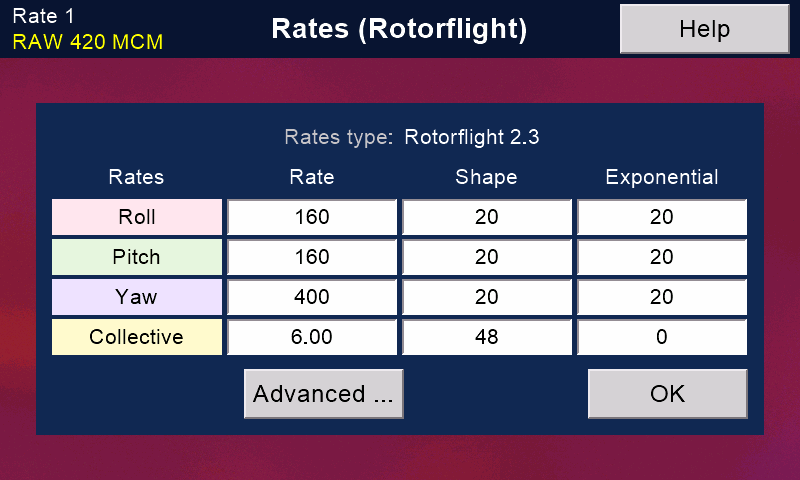
How fast the sticks turn the helicopter, and how much blade pitch the collective gives, for the rate shown at the top left.
To change them
- Choose the rate with its switch. Wait while it loads.
- Touch a box and type the new value.
- Press 'Save' (it appears once you touch a box).
The values are written to the flight controller, read back to check, and stored.
Which switch
The 'Rates' switch chooses the rate.
With no 'Rates' switch, it is Rate 4.
With 'Link rates and banks' on ('Settings ...' on the 'Rotorflight' page), the bank switch chooses it instead.
Good to know
Save before you move the switch: a move loads the other rate, and unsaved changes are lost.
To check a save, move the switch away and back.
The page reads the values again.
If the page says nothing came back, do the same, or leave the page and open it again.
'Save' writes only into the transmitter's rate.
'Rate 2 / FC 1' at the top left: the flight controller is on rate 1. The page shows rate 1, but 'Save' writes nothing, and a message says so. Check the set-up of the switch that chooses the rate. (The check needs Bluetooth joined.)
The numbers
Roll, Pitch and Yaw: degrees per second, which the flight controller will seek (physics permitting).
Collective: degrees of blade pitch, if the mechanism allows.
A value between steps goes to the nearest step (in steps of 10, 163 becomes 160; in steps of 5, 165).
The columns
They follow the rate's type, on the 'Rates type:' line.
'6 - ROTORFLIGHT': Rate, Shape and Expo.
Rate goes in steps of 5, up to 1275 (Collective: 0.125).
Shape and Expo are whole numbers, 0 to 255.
Every other type: Centre, Max rate and Expo.
Centre and Max rate go in steps of 10, up to 2550 (Collective: 0.25).
Expo goes from 0 to 1, in steps of 0.01.
Rates type
'Rates type:' names the type the flight controller uses, such as '4 - ACTUAL'. To change it:
- Touch the type. Turn the wheel to another, press 'OK'.
- The rates go to that type's starting values, as in Rotorflight's own Configurator: about 240 degrees a second at full stick for Roll and Pitch, 400 for Yaw, and 12.5 degrees of Collective.
- Change any value you want, then press 'Save'.
'Cancel' changes nothing. Nothing is sent before 'Save'.
'OK' on the type already shown gives its starting values too.
WHY NOT KEEP THE NUMBERS? Each type reads them its own way.
Rotorflight's 'Rate 250' is 'Centre 500' to ACTUAL: twice as fast, and twice the Collective.
The numbers here match the Configurator for '4 - ACTUAL', and for '6 - ROTORFLIGHT' on 2.3: the easiest to read.
'6 - ROTORFLIGHT' needs Rotorflight 2.3.
Curves
'Curves ...' draws this rate's four curves from the numbers on the page (typed but not yet saved too), worked out with Rotorflight's own formulas. Across: the stick, from full one way to full the other. Up: how fast the model turns.
Roll, Pitch and Yaw share one scale; Collective (degrees of blade pitch) has its own. The boxes on the left give each one's value at full stick. A curve lying on another (Pitch the same as Roll) is drawn dashed, so both show.
THE DOTS: each curve has a dot where its stick is now, as the flight controller reads it. Move a stick: its dot rides along its curve, and shows how fast the model would turn there.
'OK' goes back to the numbers.
'Dynamics ...' opens 'Rates: dynamics' for the same rate.
It asks first if you have unsaved changes.
'OK' goes back to the 'Rotorflight' page.
With unsaved changes it asks 'Save now?': 'Save' saves them, and the page closes once saved; 'Discard' leaves without saving.
The page opens only with the safety on.
With no model connected, it shows the model's backup (see the help on the 'Rotorflight' page).
Still stuck?
See common questions, or write to mmessiter@gmail.com. Say which page, and what the screen showed.