Rates: dynamics
The help for this page of the Version 2 transmitter, as its latest update shows it. On the transmitter, Animation at the top of this help page plays a short film of the page in use.
On the transmitter: Model setupRotorflightRatesDynamics
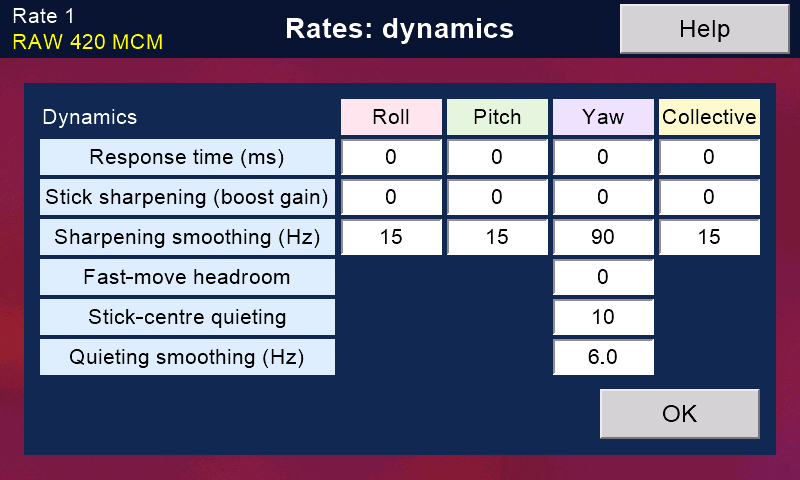
How the model follows the stick, for the rate shown at the top left. The phone app has these in the 'Dynamics' card of its 'Rates' page (in the Configurator: the Rates tab).
To change them
- Choose the rate with its switch, as on the Rates page.
Wait while it loads. - Touch a box and type the new value.
- Press 'Save' (it appears once you touch a box).
The values are written to the flight controller, read back to check, and stored.
Good to know
Save before you move the switch: a move loads the other rate, and unsaved changes are lost.
To check a save, move the switch away and back.
The page reads the values again.
If the page says nothing came back, do the same, or leave the page and open it again.
'Save' writes only into the transmitter's rate.
'Rate 2 / FC 1' at the top left: the flight controller is on rate 1. The page shows rate 1, but 'Save' writes nothing, and a message says so. Check the set-up of the switch that chooses the rate. (The check needs Bluetooth joined.)
For roll, pitch, yaw and collective
Response time (ms): how long the model takes to reach the rate the stick asks for. Higher feels softer. 0 is off.
Stick sharpening (boost gain): extra response on quick stick moves (Configurator: setpoint boost gain).
Sharpening smoothing (Hz): the filter on that boost. Lower is smoother (Configurator: setpoint boost cutoff).
For yaw only
Fast-move headroom (Configurator: dynamic ceiling gain).
Stick-centre quieting (Configurator: dynamic deadband gain).
Quieting smoothing (Hz): the filter on the quieting (Configurator: dynamic deadband filter).
The numbers
Quieting smoothing has one decimal place, such as 6.0 (up to 25.5). All the others are whole numbers, 0 to 255.
'OK' leaves the page. With unsaved changes it asks 'Save now?':
'Save' saves them, and the page closes once saved;
'Discard' leaves without saving.
With no model connected the page shows the model's backup (see the help on the 'Rotorflight' page).
Still stuck?
See common questions, or write to mmessiter@gmail.com. Say which page, and what the screen showed.