PIDs: advanced (PID +)
The help for this page of the Version 2 transmitter, in its newest words. A transmitter on V2 B92 or older shows older words.
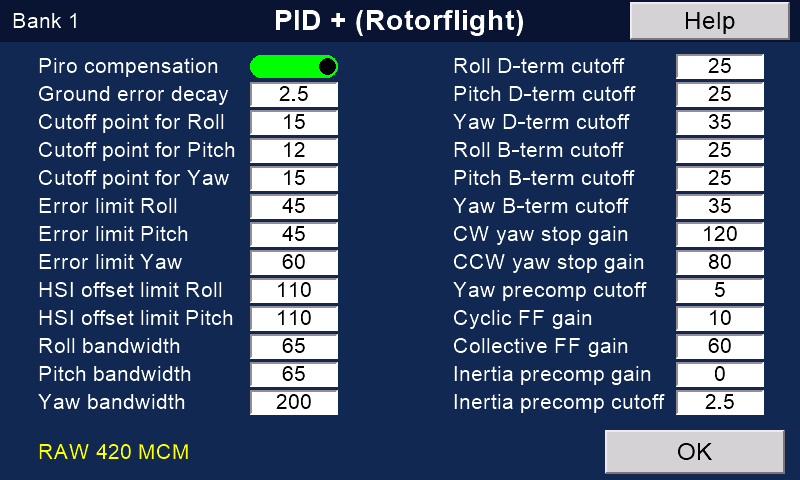
On the transmitter: Model setupRotorflightPIDsAdvanced
The rest of the flight controller's PID settings, for the bank shown at the top left (the Profiles tab of the Configurator).
Most models fly well on Rotorflight's own values.
Change one only when you know why.
To change them
- Choose the bank with the bank switch. Wait while it loads.
- Touch a value, or its name, and type the new value.
- Press 'Save' (it appears once you touch a value).
The values are written to the flight controller, read back to check, and stored.
Check the name
The keypad shows the name of the value you are changing.
Check it: the wrong one is easy to touch on this crowded page.
If it is the wrong one, press 'Cancel': nothing changes.
Good to know
Save before you move the switch: a move loads the other bank, and unsaved changes are lost.
To check a save, move the switch away and back.
The page reads the values again.
If the page says nothing came back, do the same, or leave the page and open it again.
'Bank 3 / FC 2' at the top left: the flight controller is on bank 2, so the page shows and saves bank 2.
The numbers
'Piro compensation' is a switch: touch it to turn it on or off.
'Ground error decay' and 'Inertia precomp cutoff' have one decimal place (0.0 to 25.5).
All the others are whole numbers, 0 to 255.
'OK' leaves the page. It asks first if you have unsaved changes.
With no model connected the page shows the model's backup (see the Rotorflight options help).
Still stuck?
See common questions, or write to mmessiter@gmail.com. Say which page, and what the screen showed.