Governor
The help for this page of the Version 2 transmitter, as its latest update shows it. On the transmitter, Animation at the top of this help page plays a short film of the page in use.
On the transmitter: Model setupRotorflightGovernor
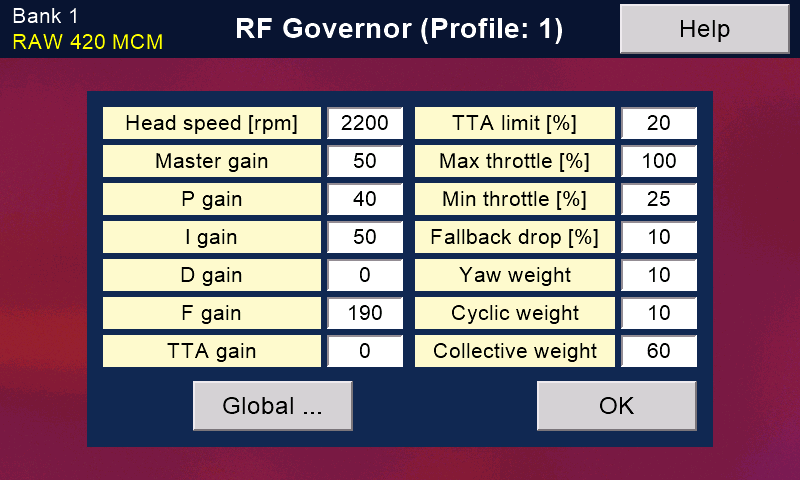
The governor values Rotorflight keeps for each bank:
the head speed, and how the governor holds it.
The title shows the bank, such as 'Governor (bank 2)'.
The settings shared by every bank are on 'Global ...'.
It needs Rotorflight 2.3 (the version is in 'Settings ...').
Defaults
'Defaults' puts Rotorflight's own values (2.3) in every box - a starting point for a new model, not a tune. Nothing reaches the flight controller until you press Save.
To change them
- Choose the bank with the bank switch. Wait while it loads.
- Touch a value, or its name, and type the new value.
- Press 'Save'.
The values are written to the flight controller, read back to check, and stored.
'Save' is refused while the model could be armed.
Good to know
Save before you move the switch: unsaved changes are lost.
'Global ...' asks first if you have unsaved changes.
To check a save, move the switch away and back.
The page reads the values again.
If the page says nothing came back, do the same, or leave the page and open it again.
'Save' writes only into the transmitter's bank.
'Bank 2 / FC 1' at the top left: the flight controller is on bank 1. The page shows bank 1, but 'Save' writes nothing, and a message says so. Check the bank switch's set-up.
(The check needs Bluetooth joined.)
The values
Headspeed (rpm): the head speed this bank holds.
Master gain: the overall strength. It scales P, I, D and F.
P, I and D gain: how the governor corrects a head speed error.
F gain (feed-forward): the strength of the three 'Anticipate' values.
Tail-torque strength (TTA gain) and Tail-torque limit (%):
tail torque assist (TTA). The head speed may rise to help the tail in hard yaw. The limit is the most it may rise.
Max throttle (%) and Min throttle (%): the most and the least throttle the governor may use.
Fall-back drop (%): how much the throttle drops if the head speed signal is lost (0 to 50).
Anticipate yaw, Anticipate cyclic and Anticipate collective (yaw, cyclic and collective weight): how much each stick adds throttle before the load arrives.
PID spool-up (16 MB screens only):
ON: the governor ramps the head speed itself, with its own gains, so the spool-up ends exactly at this bank's head speed.
OFF (Rotorflight's default): your throttle ramps it, and the governor takes over at handover.
It needs Governor mode 3 or 4 (on the 'Global ...' page):
with any other mode Rotorflight turns it off again, and the check after 'Save' says so.
Easy tuning can turn it on in every bank at once.
'OK' goes back to the 'Rotorflight' page.
With unsaved changes it asks 'Save now?': 'Save' saves them, and the page closes once saved; 'Discard' leaves without saving.
With no model connected the page shows the model's backup (see the help on the 'Rotorflight' page).
Still stuck?
See common questions, or write to mmessiter@gmail.com. Say which page, and what the screen showed.