Governor: settings for every bank
The help for this page of the Version 2 transmitter, as its latest update shows it. On the transmitter, Animation at the top of this help page plays a short film of the page in use.
On the transmitter: Model setupRotorflightGovernorGlobal
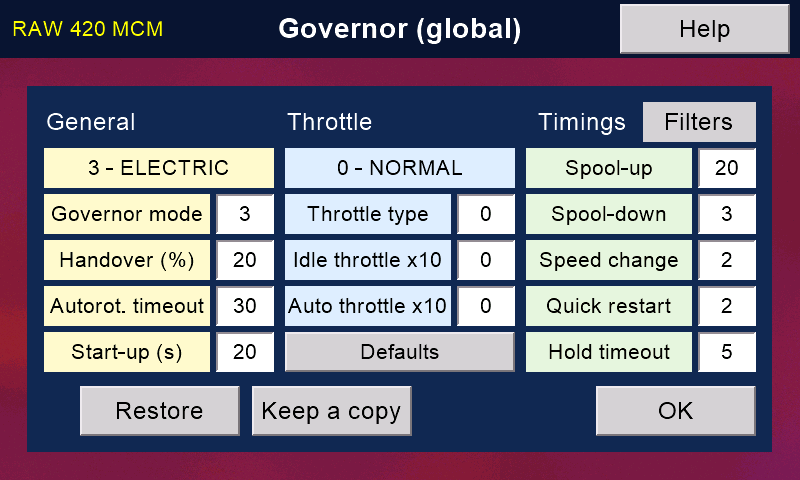
The governor settings shared by every bank:
its mode, the throttle and the timings.
Each bank's head speed and gains are on the Governor page.
It needs Rotorflight 2.3.
Defaults
'Defaults' puts Rotorflight's own values (2.3) in every box - a starting point for a new model, not a tune. Nothing reaches the flight controller until you press Save.
To change them
Touch a value, or its name, and type the new value.
Governor mode and Throttle type take only the numbers listed below: 'Save' refuses any other (Rotorflight would keep it, then call its settings corrupted).
Then press 'Save': it writes the values, checks and stores them.
Then the flight controller restarts: Rotorflight reads these only as it starts.
'Save' is refused while the model could be armed.
If a read fails, it goes back to the Governor page: try again.
General
Governor mode: 0 to 4. The box above it names the mode:
'0 - OFF', '1 - LIMIT', '2 - DIRECT', '3 - ELECTRIC' or '4 - NITRO'. '3 - ELECTRIC' is the full governor for an electric helicopter.
Handover (%): above this throttle the governor takes over, and spools up to the bank's head speed.
Autorot. timeout: in seconds. How long an autorotation keeps the quick bail-out ready. 0: no autorotation.
Start-up (s): only the first creep of the motor, from zero to the handover throttle. Rotorflight's default is 20.
(16 MB screens only.)
Throttle
Throttle type: 0 to 2. The box above it names the type:
'0 - NORMAL' (the usual): the throttle goes to the governor as it is.
'1 - SWITCH': above handover, the throttle sets the head speed (80 % throttle asks for 80 % of the bank's head speed).
For ELECTRIC and NITRO only.
'2 - FUNCTION': the throttle channel is a three-way switch:
idle throttle, auto throttle, full.
Idle throttle x10: the throttle while idling below handover.
Auto throttle x10: the throttle during an autorotation.
x10 means tenths of a per cent: 50 is 5 %.
Timings (s)
In whole seconds. Rotorflight keeps tenths, so a time of 2.5 s shows as 3, and is saved as 3.
Spool-up: the time to reach head speed. Higher is gentler.
Spool-down: the time to wind down when you lower the throttle.
Speed change (tracking time): how fast the head speed follows a change, such as a bank change.
The time is for the whole range: a small change is quicker.
Quick restart (recovery time): the quick spool-up after a short throttle hold.
Hold timeout: how long the quick spool-up stays ready after a throttle hold.
FILTERS (Hz) - touch 'Filters' at the top right:
(16 MB screens only. On a 4 MB screen they are not shown, and 'Save' keeps them as they were.)
They smooth the signals the governor reads. Lower = smoother, but slower to react. Change them only to cure a head speed that hunts or surges, and one at a time.
RPM filter: the head-speed signal. Default 10.
Power filter: the battery voltage and current. Default 5.
Feed-fwd filter: the early throttle for collective and cyclic. Default 5.
Tail filter: tail-torque assist. 0 = off (the default).
D filter x10: tenths of a Hz: 50 is 5 Hz (the default).
Touch 'Timings' to go back.
A copy in the model's file
'Keep a copy' stores the page's values in the model's file on the transmitter's card. It asks first.
It does not send them to the flight controller:
press 'Save' first if you changed anything.
'Restore' writes that copy to the connected model's flight controller, which then restarts. It asks first.
This copy is not the backup made with 'Backup & restore ...'.
'OK' goes back to the 'Rotorflight' page.
With unsaved changes it asks 'Save now?': 'Save' saves them, and the page closes once saved; 'Discard' leaves without saving.
No model connected: the page shows the model's backup.
With no backup either, 'Save' does the same as 'Keep a copy'.
Still stuck?
See common questions, or write to mmessiter@gmail.com. Say which page, and what the screen showed.