Rates
The help for this page of the Version 2 transmitter, in its newest words. A transmitter on V2 B92 or older shows older words.
On the transmitter: Model setupRates
Rates make chosen channels move less (or more) for the same stick movement.
There are three rates, each 0 to 200%. One is normally 100%.
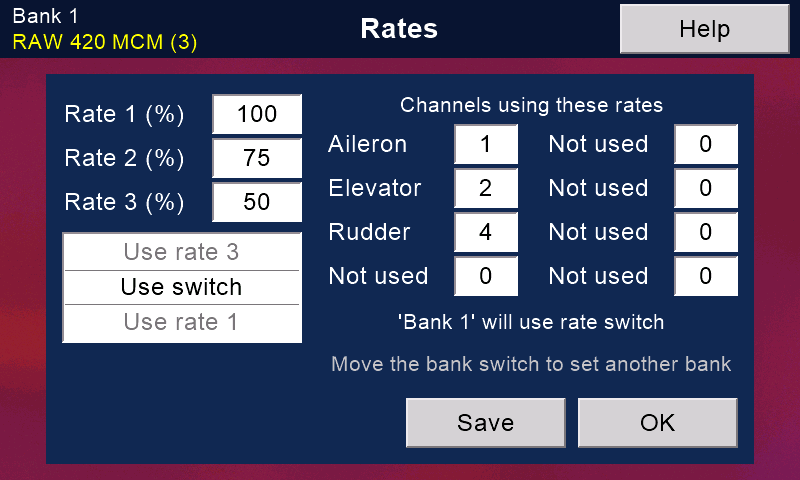
To set up rates
- Touch the box beside 'Rate 1 (%)', 'Rate 2 (%)' and 'Rate 3 (%)' in turn, and type each percentage.
- Under 'Channels using these rates', touch a box and type a channel number: up to eight, usually aileron, elevator and rudder. 0 = not used.
Each channel's name appears beside its number. - Press 'Save' to keep your changes and stay, or 'OK' to keep them and leave.
Which rate is used
The switch with the 'Rates' job picks the rate: away is rate 1, mid is rate 2, near is rate 3.
The 'Rates' job is set in 'Transmitter setup', then 'Switches'.
With no 'Rates' switch, every channel gets 100%.
Channels not in the list always get 100%.
The list of choices
The list ('Use switch', 'Use rate 1', 'Use rate 2', 'Use rate 3') is meant to let each bank choose: follow the rates switch, or always use one rate.
It sets the bank in use now, named in the line under the channels. Move the bank switch to set another bank.
For now the transmitter keeps this choice but does not act on it:
in flight, the rates switch alone picks the rate.
How a rate works
A rate shrinks the channel's curve towards the middle (or, over 100%, stretches it).
At 50% the servo moves half as far.
The same three rates apply in every bank.
Rotorflight models
A Rotorflight model does not use these percentages.
Set its rates on 'Rotorflight', then 'Rates ...'.
There, the 'Rates' switch picks which rate you see and edit.
With 'Link rates and banks' on ('Settings ...'), the bank switch picks it instead.
Still stuck?
See common questions, or write to mmessiter@gmail.com. Say which page, and what the screen showed.