Batteries
The help for this page of the Version 2 transmitter, as its latest update shows it. On the transmitter, Animation at the top of this help page plays a short film of the page in use.
On the transmitter: Transmitter setupBatteries
Batteries: tell the transmitter which batteries you use.
It needs this for the percentage left and the voltage per cell.
Touch a choice: it is saved at once.
'OK' goes back to Transmitter setup.
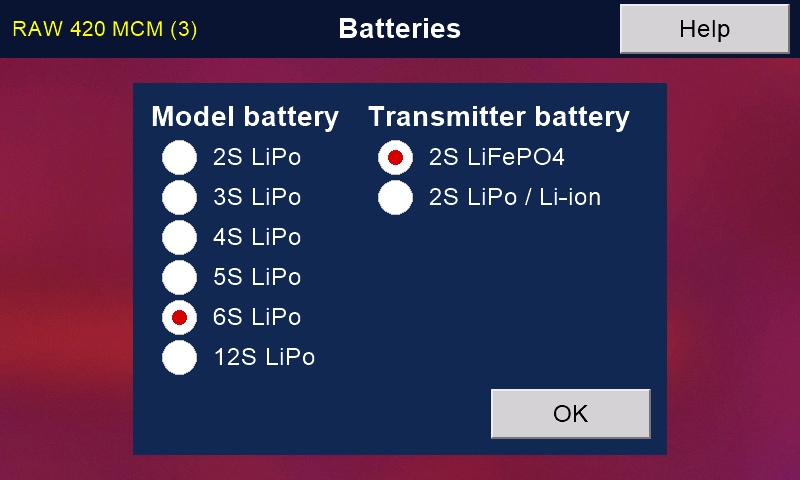
'Model battery': 2S to 6S or 12S LiPo, for the model now loaded.
Its name is at the top left. Each model keeps its own.
'Transmitter battery': 2 cells, LiFePO4 or LiPo / Li-ion.
It is the same for every model.
Charging the transmitter:
With the charger in its back (LiPo or Li-ion packs only; a LiFePO4 pack needs a LiFePO4 charger), plug it into any 5 V USB outlet, a wall plug or a computer. The red light goes out when it is charged.
You may use the transmitter while it charges, and watch the voltage on its front page.
For a longer battery life, do not always charge it full.
Stop once it is over 4 V a cell, and do not run it below about 3.75 V a cell.
The warnings are set elsewhere:
- the transmitter's on Transmitter setup > 'System';
- the model's on Model setup > 'Options'.
12S:
Choose '12S LiPo'.
A Version 2 receiver needs nothing more.
It halves any voltage above 25.2 V (a full 6S pack), and the transmitter doubles it back.
A Version 1 receiver needs a voltage divider that halves the voltage to its INA219 sensor.
The sensor cannot cope with more than 26 volts.
The transmitter does the needed arithmetic.
Still stuck?
See common questions, or write to mmessiter@gmail.com. Say which page, and what the screen showed.