Sounds and brightness
The help for this page of the Version 2 transmitter, in its newest words. A transmitter on V2 B92 or older shows older words.
On the transmitter: Transmitter setupSounds etc.
Sounds and brightness: what the transmitter says, how loud it is, how bright the screen is, and the vario.
Touch a switch to turn a sound on or off.
The sliders work at once. 'OK' keeps all your choices.
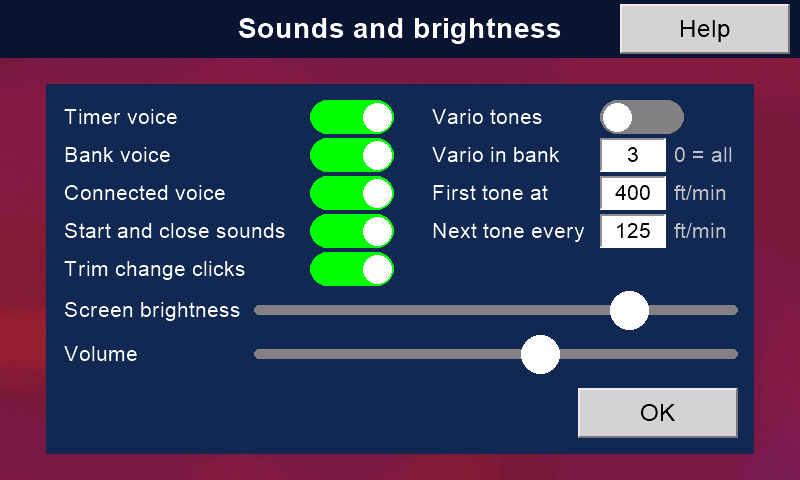
Voices and sounds
'Timer voice': says each minute of the motor timer, up to 10.
'Bank voice': says the bank or rate when you change it.
It also says motor on / off and safety on / off.
'Connected voice': says when the model connects and disconnects.
'Start and close sounds': a tune as you switch on and off.
'Trim change clicks': a click for each trim step.
A different beep marks the centre and the end.
Vario (variometer)
Tones that tell you whether the model is climbing or sinking.
Climbing, they are sine waves (they sound nice).
Sinking, they are sawtooth waves (they do not).
'Vario tones': switches the vario on.
'Vario in bank' (0 = all): the bank it sounds in.
Type 1, 2 or 3, or 0 for every bank.
'First tone at' (ft/min, 0 to 1000):
the slowest climb or sink that makes a sound.
Slower is silent.
'Next tone every' (ft/min, 50 to 1000):
how much faster the climb or sink must be for the next tone.
There are ten tones each way.
The vario needs a pressure sensor in the model's receiver:
a BMP280, or better a DPS310.
A Version 2 receiver has neither, so with one the vario stays silent.
It starts 10 seconds after the model connects.
Screen and volume
'Screen brightness' sets the screen.
Its lowest is 10, so it never makes the screen fully dark.
'Volume' sets every sound.
Still stuck?
See common questions, or write to mmessiter@gmail.com. Say which page, and what the screen showed.