First-time basics: throttle calibration
The help for this page of the Version 2 transmitter, as its latest update shows it. On the transmitter, Animation at the top of this help page plays a short film of the page in use.
On the transmitter: Model setupRotorflightSettingsFirst-time basicsNextNextNext
Teaches the ESC the throttle range Rotorflight sends (1000 to 2000 us): the Configurator's Motors tab procedure, with no computer. The phone app has the same on its 'ESC setup' page: 'Throttle calibration'.
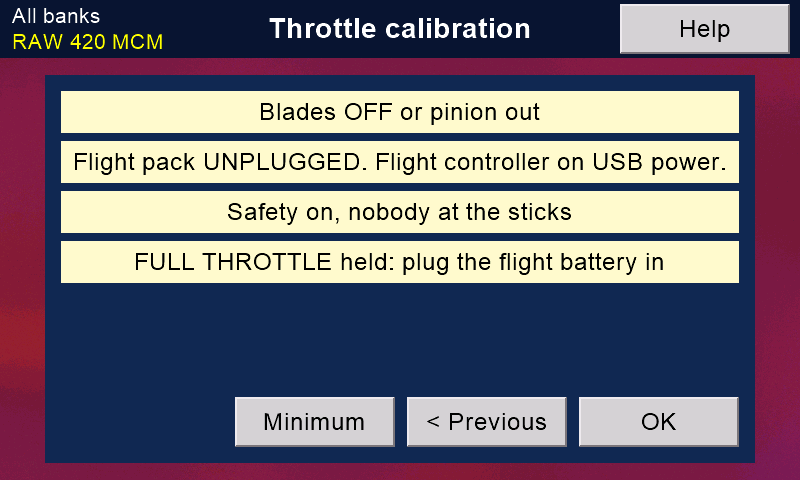
Before you start
Blades OFF, or the pinion out of the main gear.
Flight pack UNPLUGGED. The flight controller on USB power (a power bank), so that the battery can be plugged in AFTER full throttle is held.
Safety on, and nobody at the sticks.
How it goes
- Tap 'Full throttle' and answer the question.
The fourth line says FULL THROTTLE held. - Plug the flight pack in. The ESC sees full throttle as it wakes, and beeps to say it has learned the top.
- Tap 'Minimum'. The hold is let go, the ESC sees minimum and beeps again: the bottom is learned.
- 'Calibrated: unplug the battery'. Done.
How it is kept safe
The flight controller obeys the hold only while disarmed, and forgets it by itself one second after the last renewal. This page renews it about three times a second while the fourth line says held. Leave the page, lose the link or flick the safety, and the hold is gone a second later. If a renewal gets no answer in time, the page says the hold lapsed: start again.
'< Previous' goes back to 'Ports'. 'OK' leaves.
Nothing here is saved: the ESC itself remembers the range.
Still stuck?
See common questions, or write to mmessiter@gmail.com. Say which page, and what the screen showed.