Servos
The help for this page of the Version 2 transmitter, in its newest words. A transmitter on V2 B92 or older shows older words.
On the transmitter: Model setupRotorflightServos
Rotorflight's settings for each servo, one servo at a time, as the configurator's Servos tab has them.
The same in every bank: the bank shown at the top left does not matter here.
It needs the safety on (model disarmed) and a Version 2 receiver with Bluetooth. With no model, the page shows the model's backup on the card, if one was made: a 'Save' then changes the backup, and the change is offered to the model when it next connects.
Tap a number to type a new one.
Tap a switch to change it (green = on).
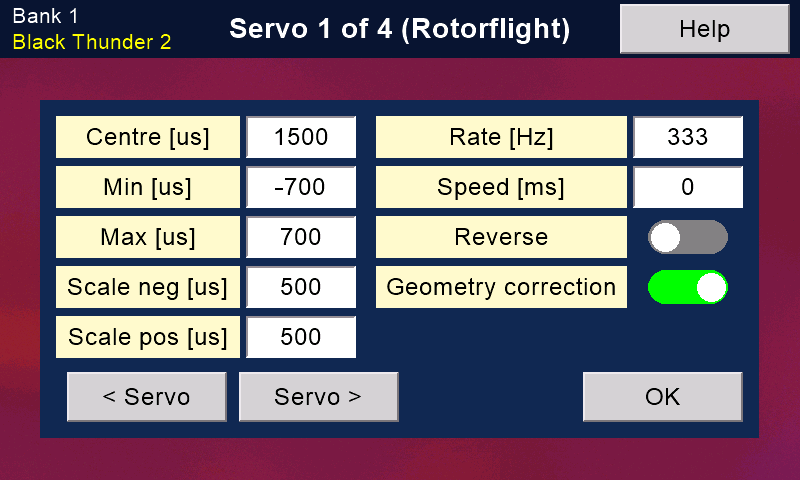
'< Servo' and 'Servo >' step through the servos. The title says which one you are on (Servo 2 of 4). Servos 1, 2 and 3 are usually the swashplate, 4 the tail.
'Save' appears once something is changed. It writes this servo to the flight controller, stores it there and reads it back.
Save each servo before you move on: a change not saved is dropped (it asks first).
'OK' leaves; if a change was not saved, it asks first.
The settings
Centre [us]: where the arm sits with the sticks centred, in microseconds (750 to 2250). Adjust it so the linkages are level.
Min and Max [us]: the stops. The servo never moves further from the centre than these (-1000 to 0, and 0 to 1000).
Scale neg and Scale pos [us]: how much arm movement a full stick asks for, each way (50 to 1000). Usually both the same.
Rate [Hz]: how often the servo is sent a new position (25 to 5000). Never more than the servo's specification allows.
Speed [ms]: slows the servo down. It is the time the arm takes to move 60 degrees (0 to 60000). 0 = full speed (normal).
Reverse: turns this servo the other way, like a servo-reverse switch. To reverse a control (aileron, elevator, collective or yaw), use 'Mixer ...' on the Rotorflight options page instead.
Geometry correction: evens out the arc of the servo arm, so equal commands give equal swash movement up and down.
Usually on for the three swashplate servos.
Still stuck?
See common questions, or write to mmessiter@gmail.com. Say which page, and what the screen showed.