Log
The help for this page of the Version 2 transmitter, in its newest words. A transmitter on V2 B92 or older shows older words.
On the transmitter: Model setupLog
Read the transmitter's log: what happened each day it was used.
'Log' on 'Model setup' opens today's log, named at the top.
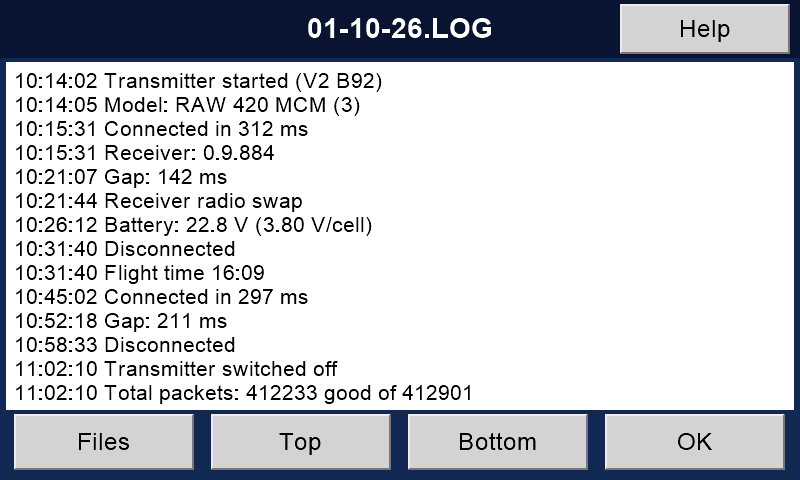
To move around
Drag the text up or down to scroll.
'Top' and 'Bottom' jump to the start and the end.
'Files' lists all the log files, to view or delete them. With a model connected it says 'Switch it off to see the files.'
No log yet today? Then it says 'File not found'.
Press 'Files' to read another day.
'OK' goes to the 'Telemetry' page.
What it records
Connections, disconnections and gaps in the radio link.
Which model memory was found, and bank and rate changes.
The motor and safety switches, and the buddy switch.
How long the motor ran, battery voltages and warnings.
The highest head speed, current and temperature, and mAh used.
Each event is marked with the time.
Gaps
A gap is when data packets fail to arrive, through interference or great distance. The system reconnects as fast as possible.
Gaps are measured in milliseconds (ms).
Short gaps, up to 100 ms or so, are not noticed by most pilots.
Longer ones might point to a problem.
Settings
On 'Transmitter setup', 'System', then 'Next >' twice (Advanced):
'Keep log files' switches logging on or off.
'Log receiver radio swaps' records when the receiver swaps between its radios (transceivers).
'Log gaps longer than' sets the shortest gap logged (in ms).
The SD card
Log files are kept on the transmitter's SD card.
A new file is started each day, named by the date.
SD cards only last a year or so; they last longer when rarely written to. So switch logging off when you do not need it, and keep a copy of the card's files on your computer.
Still stuck?
See common questions, or write to mmessiter@gmail.com. Say which page, and what the screen showed.